
The final step that an administrator must take in Time and Attendance at the end of every pay period is to formally end the pay period. This action should not be taken until all time is correctly captured, payroll processing is complete, and checks have been issued.
Below are the steps needed to close the pay period. Ending the pay period commits all timesheet and accrual data to history and advances the dates of the current pay period forward. Before processing the next pay period data for pay, the last pay period must be closed and the system brought current.
To end the current pay period(s) in the Time and Attendance system, follow the steps below:
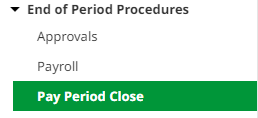
- Navigate to End of Period Procedures on the left navigation menu and select Pay Period Close.
- The current pay period will be highlighted in red. Verify that the Period to End and Next Period fields are accurate. The Payroll History and Accruals History dropdowns should be set to “Yes.”
- Click the End Period button. If any employee timecards have missing data (missing punches, outstanding requests, or not fully approved), you will receive an error message until they have been addressed.
- Once completed, you will receive a success message.