
This guide outlines the proactive steps Applicable Large Employer (ALE) clients can take now to ensure a smooth ACA year end and accurate 1095-B and 1095-C forms.
The steps below cover confirming your ALE status, validating hours of service, reviewing your ACA and benefit configuration, checking employee statuses, and identifying how your health plan is funded.
Action required! Communicate any ACA changes to the HRCore ACA team at HRCoreACA@insperity.com by 12/1/2026. Before you send your changes, confirm that your ACA configuration, employee statuses, and benefit elections are complete and accurate.
Key dates: Your ACA forms will be ready for approval on 1/1/2027 and must be reviewed and approved by 1/22/2027. By 11/30/2026, all companies that have chosen to implement ACA will receive communication with the steps to review and approve their forms.
If you do not receive this notification, contact the HRCore ACA team at HRCoreACA@insperity.com
Step 1: Determine if you’re considered an Applicable Large Employer (ALE) for the 2026 ACA reporting year.
If 50 or more full-time or full-time-equivalent (FTE) employees worked for your organization in the 2025 calendar year, you are considered an Applicable Large Employer (ALE) and must provide ACA-compliant health insurance and report affordability and coverage in 2026.
You can use ACA reports in isolved People Cloud™ to determine your ALE status if you have pay history for 2025.
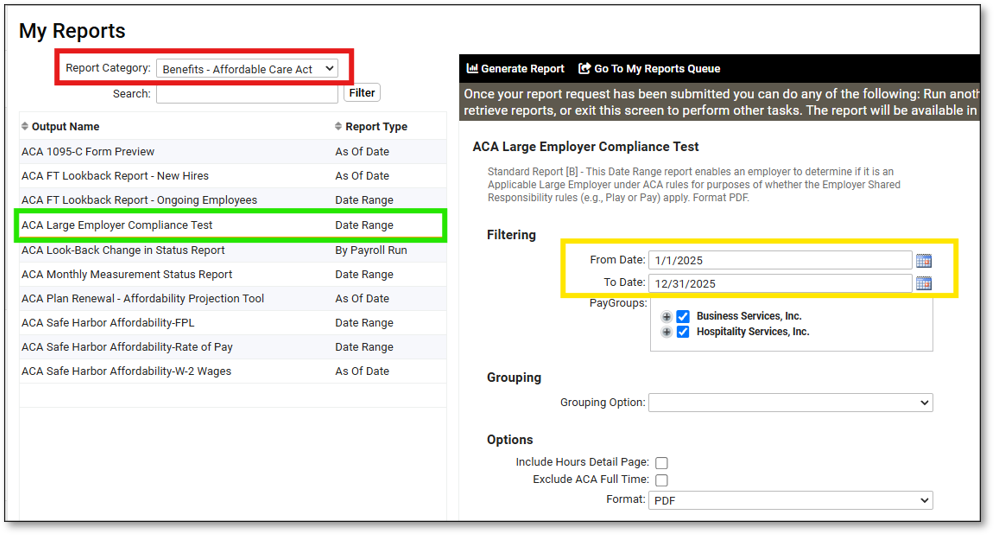
- To run ACA reports, navigate to My Reports and set your Report Category to Benefits – Affordable Care Act and click Filter.
- To determine if you qualify as an Applicable Large Employer (ALE) for the 2025 ACA reporting year, select the ACA Large Employer Compliance Test report.
- Since ALE status is based on your full-time equivalent employee count in the prior year, run the report for 1/1/2025 – 12/31/2025.
- Verify the counts and employee hours history.
- If you averaged 50 or more full-time and full-time equivalent (FTE) employees in 2025, you are considered an Applicable Large Employer (ALE).
Step 2: Ensure the right codes are selected for accurate ACA hours of service measurement.
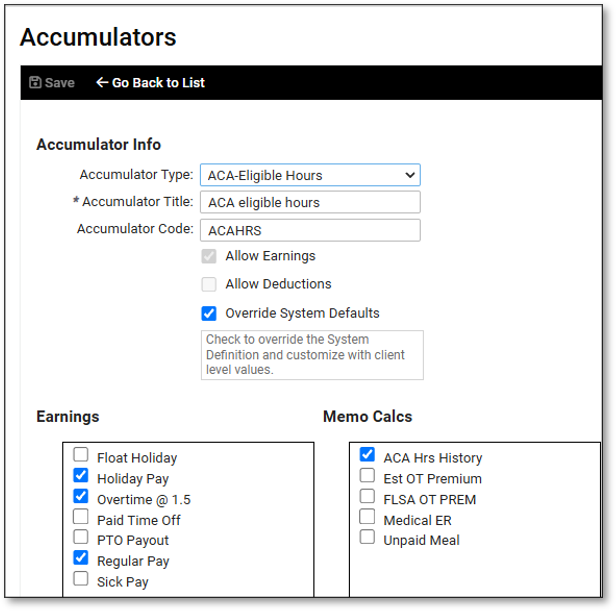
isolved accumulates hours of service each payroll for ALE reporting and ACA measurement. Compare the Employee Hours by Month section of the ACA Large Employer Compliance Test report to your Payroll Register Export by Date Range to ensure the right earning and memo codes are counted.
If you are a client user with the Client Maintenance or View Client Base roles, you can navigate to Client Management > Payroll > Accumulators and view the ACA-Eligible Hours accumulator to see which earning and memo codes are included.
Refer to the IRS Identifying full-time employees guidance to understand which earnings and memo calculations to include as hours of service in ALE and FTE measurements.

Step 3: Review ACA and benefit configuration.
For the system to generate accurate ACA forms for your employees at year end, your benefit and ACA configuration in isolved People Cloud must be complete and current. Review the following areas to be sure you’re ready for 1095 form generation:
Medical benefit plan configuration
- Medical benefit plans offering minimum essential coverage for minimum value must be configured to cover all months in the 2026 calendar year.
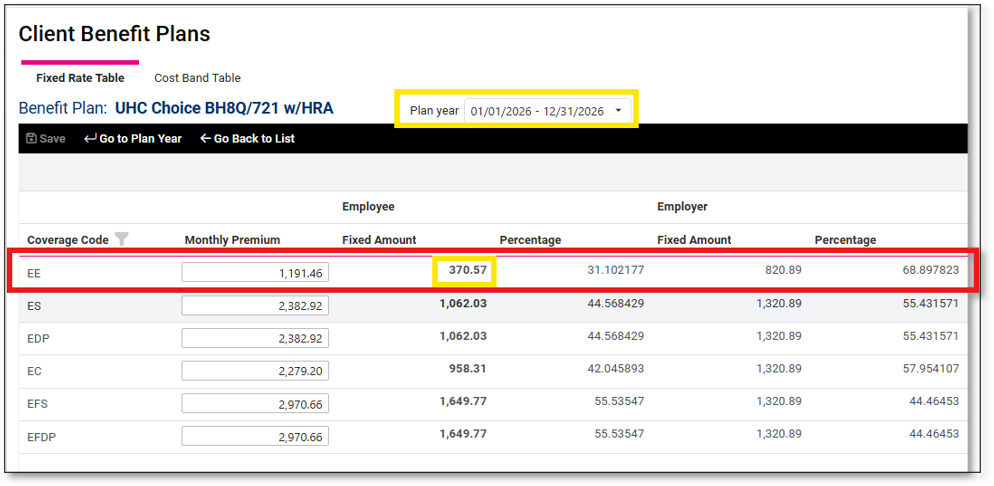
- Medical benefit plans must have accurate employee and employer monthly premium costs for Employee Only coverage on the Rates tab for 2026. Those costs are used to determine if the coverage met ACA affordability standards. If the coverage was too expensive or only met affordability standards using a safe harbor method, they will be included on Line 15 of the ACA 1095-B and 1095-C forms. The system uses the lowest employee only premium cost for health insurance plans they’re eligible for with the Minimum Essential Coverage and Minimum Value boxes checked.
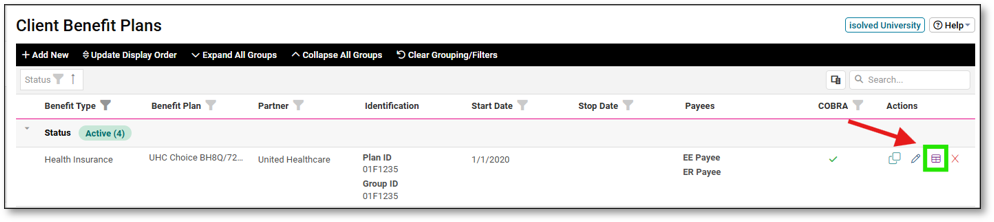
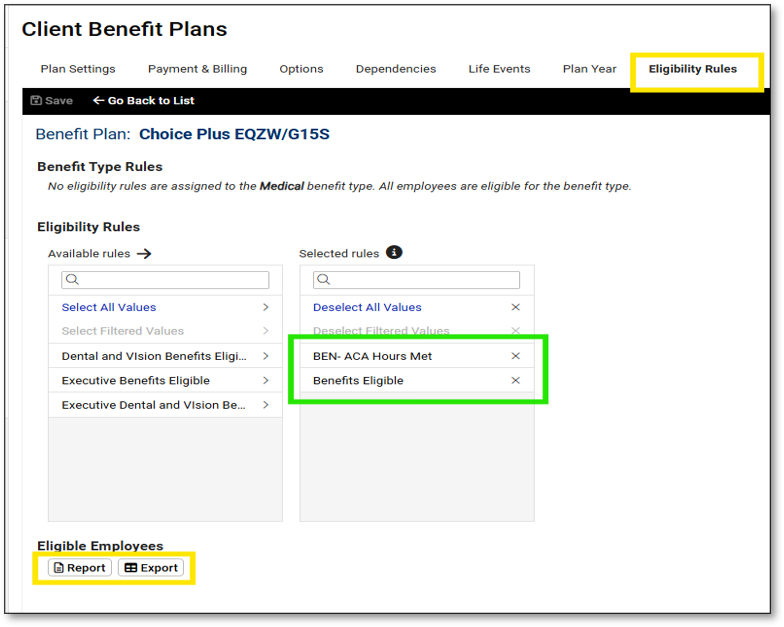
- Medical benefit plans must have eligibility rules that accurately define which employees were offered coverage under those plans. Eligibility rules should include employees who qualify as full-time under ACA rules even though they were hired as part-time.
- Client users with the Client Benefits role can view benefit plan configuration and run the Eligibility reports from the Options tab to confirm all employees who were offered health insurance coverage are listed.
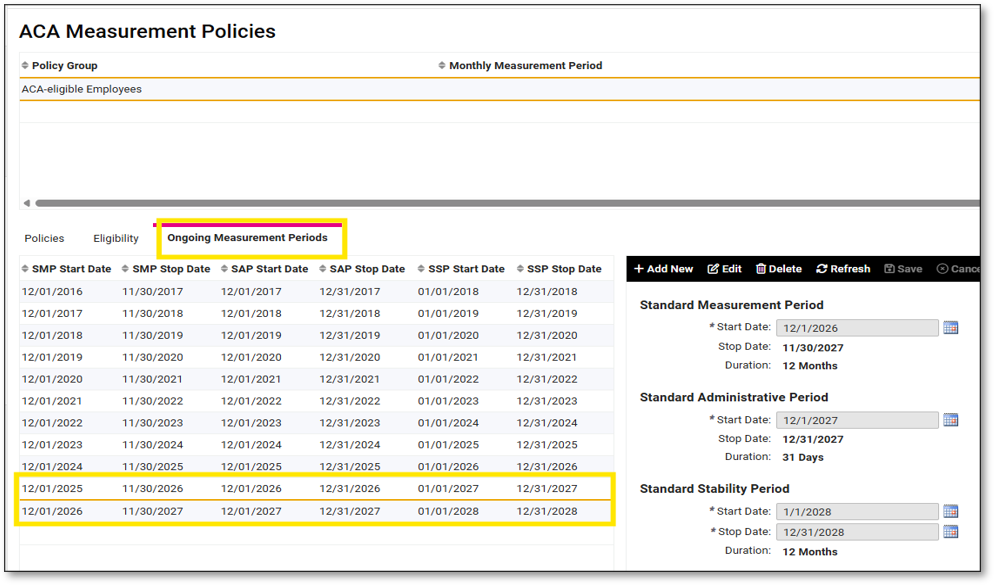
Review annual ACA measurement and reporting cycles for accuracy.
STEP 4: Review employee statuses and employment categories.
1095-B and 1095-C forms will automatically code based on these identifiers.
STEP 5: Determine if you are fully insured or self-insured.
Did you offer health insurance provided by an insurance carrier, or was your group health partially or fully self-funded?
If you contracted with an insurance company to provide health insurance to your employees, the insurance company takes on the responsibility for providing minimum essential coverage details to the IRS in annual ACA reporting. Your health insurance provider will file 1095-B, Health Coverage forms to the IRS since they are the coverage provider.
Sponsors of self-insured group health plans have reporting requirements under the Affordable Care Act (ACA), even if they are not large enough to qualify as an ALE. If your medical plan is fully or partially self-funded and you are too small to qualify as an ALE, you or your third-party administrator must provide additional details to employees and the IRS in ACA filings.
Completing these steps now will help ensure your ACA forms are accurate and ready for review. Remember to send any ACA changes to the HRCore ACA team by 12/1/2026 and to approve your forms by 1/22/2027.
If you have questions or do not receive your review and approval notification, contact the HRCore ACA team at HRCoreACA@insperity.com.