
You can use job costing in Insperity® Time and Attendance to provide visibility into what departments or projects an employee spends time on during their working hours. Job costing in Insperity Time and Attendance is not intended to serve as a method for billing hours; it only provides insight. It’s tracked by using organization levels for job-costing splits. You can use organization-level assignments to track which locations or projects employees are working on during a specific day or week. Employees can track against one or more organization levels each day, and the data can be included in payroll processing if desired.
Job costing information can be applied to punches (manually added to the time sheet or entered via the Insperity Web Punch Clock or a hardware time clock), hours entries and manually entered dollars entries. If the majority of an employee’s hours are tracked against the same job-costing splits, they can have default values assigned, which will automatically apply to their punches and/or hours entries.
Adding job costing when punching in
Employees may add job costing when punching in or out by taking the following steps.
- Click on the PUNCH IN/OUT button.
- The employee can punch in or out with their default assigned organization levels by selecting Yes from the Default Organization Levels drop-down box and then clicking the button for the punch type they are entering (e.g., IN FOR DAY). They may enter punches for different organization levels by selecting No and then clicking the button for the punch type they are entering.
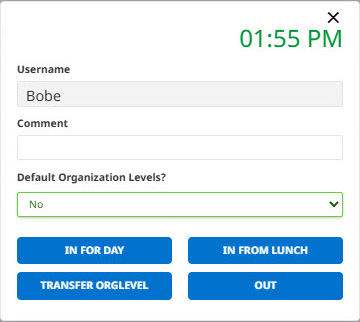
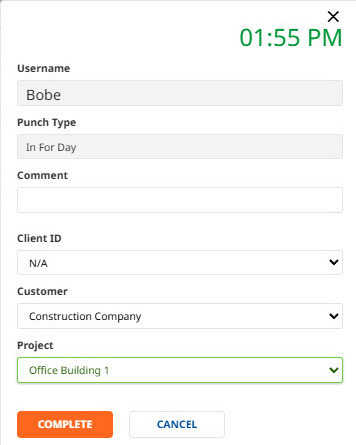
- If No is selected, the employee will be prompted to select the organization levels they are tracking time against and will need to click COMPLETE to finish the punching process.
Adding job costing to hours entries
Job costing may be added to hours entries on the time sheet.

Reporting on job costing
Job costing information can be included in reports in Insperity® Time and Attendance. If included in payroll processing, this information can also be included in payroll reports. You can view an example of a report from Insperity Time and Attendance that includes job costing below.
