
- When the clock is at an idle screen (time and date), enter “99999” and press the checkmark button.
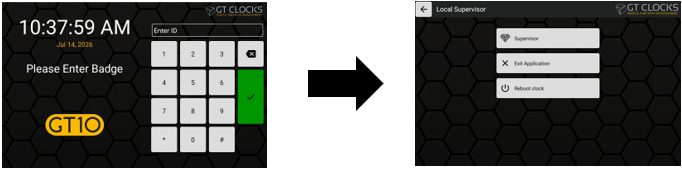
- Next select Exit Application from the options menu.
- During the application loading screen, select the Admin cog/wrench icon.
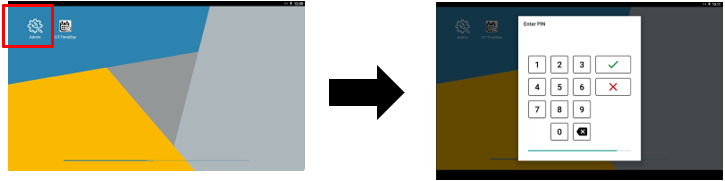
- When prompted, enter the default PIN number “1905” to access the Admin menu.
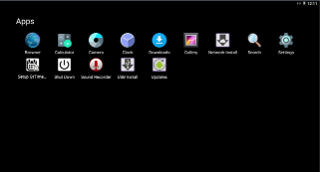
- Select the Settings cog wheel icon then GTConnect.
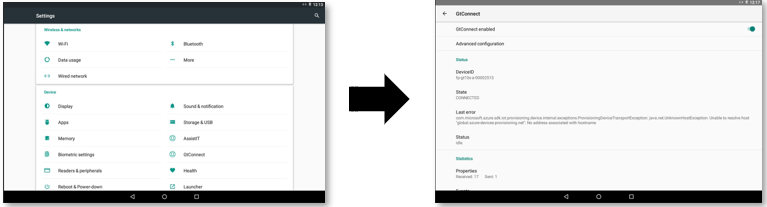
- Seeing the state display as “Connected”, is what should display for correct operation. If there is an error, it will display under the Last error section.
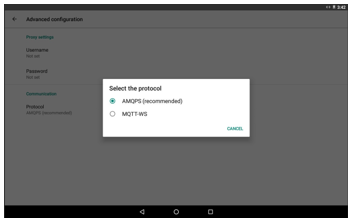
- To change the IoT protocol, if needed, select Advanced Configuration > Communication > Protocol and then select the MQTT-WS option.
- To exit out of the Admin menu, press the center navigation circle or the back navigation button at the bottom of the menu. The clock will begin to load into the clock application and go back to the idle screen.